
Keep your inbox. Add a cleaner view of the work that matters.
Keep your inbox. Add a cleaner view of the work that matters.
Connect Outlook, Gmail or another email account, choose what Maadi syncs, and get a focused workspace for the conversations, attachments and decisions your team needs - without changing how you use your existing inbox.
Connect Outlook, Gmail or another email account, choose what Maadi syncs, and get a focused workspace for the conversations, attachments and decisions your team needs - without changing how you use your existing inbox.
You choose the account, history, folders and visibility maadi can sync
You choose the account, history, folders and visibility maadi can sync
Keep your inbox. Add a cleaner view of the work that matters.
Connect Outlook, Gmail or another email account, choose what Maadi syncs, and get a focused workspace for the conversations, attachments and decisions your team needs - without changing how you use your existing inbox.
You choose the account, history, folders and visibility maadi can sync
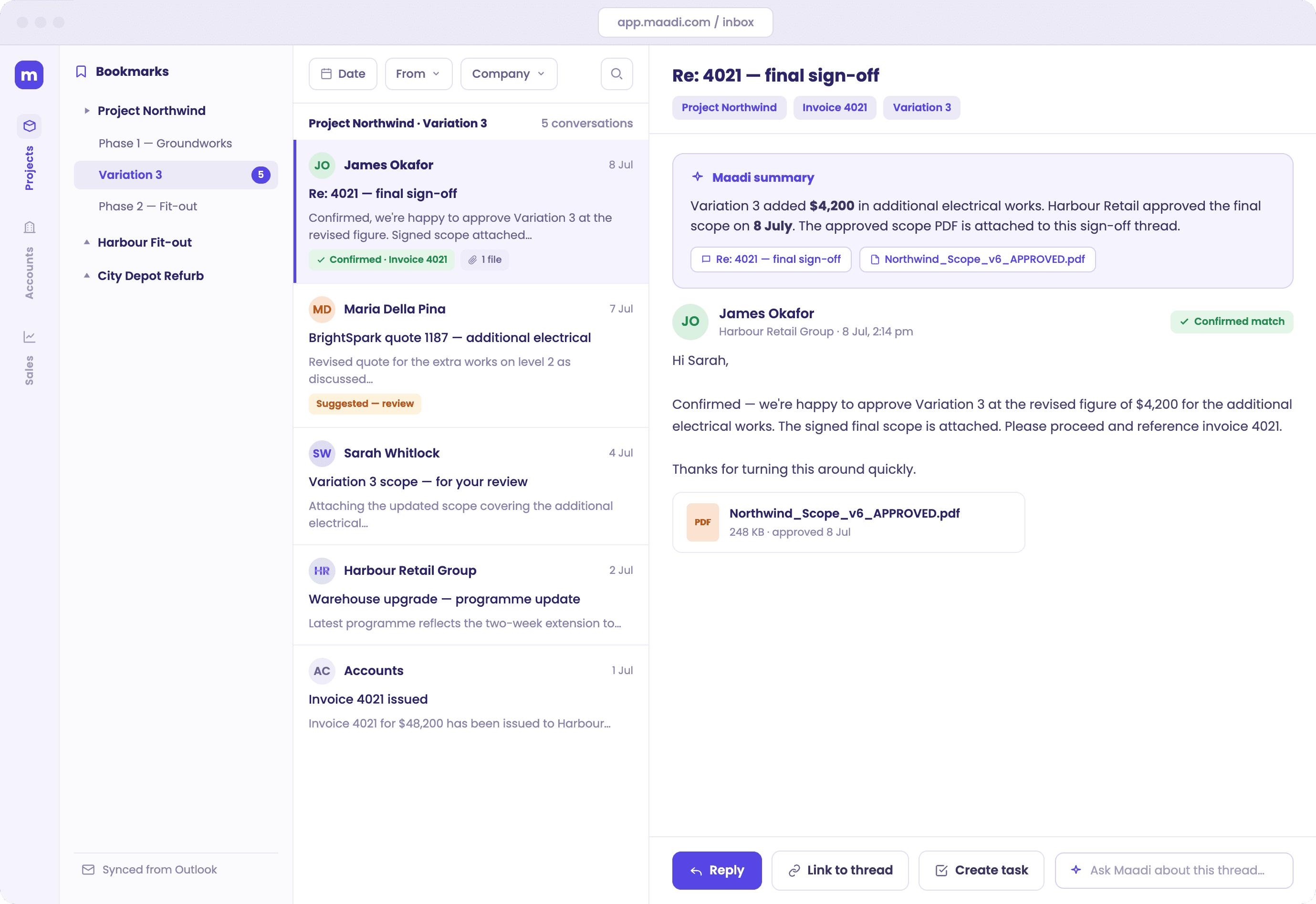
A Maadi view built from the email you choose - not another inbox you have to maintain.
Your inbox contains the answer. Finding it is the issue.
Your inbox contains the answer. Finding it is the issue.
Approvals, scope changes, instructions and final attachments are mixed in with alerts, newsletters, personal messages and long CC threads. The information is there - but finding the right version, decision or conversation still depends on who remembers where it lives.
Approvals, scope changes, instructions and final attachments are mixed in with alerts, newsletters, personal messages and long CC threads. The information is there - but finding the right version, decision or conversation still depends on who remembers where it lives.

Lost in the thread
Lost in the thread
You know a decision was made by email. You still have to find the thread, the final reply and the attachment everyone actually approved.
You know a decision was made by email. You still have to find the thread, the final reply and the attachment everyone actually approved.

Trapped in one inbox
Trapped in one inbox
The useful context often sits with one person. When they are unavailable, the team loses time reconstructing what happened.
The useful context often sits with one person. When they are unavailable, the team loses time reconstructing what happened.

Mixed with everything else
Mixed with everything else
Project email competes with notifications, CC traffic and routine messages that have nothing to do with the job in front of you.
Project email competes with notifications, CC traffic and routine messages that have nothing to do with the job in front of you.
Keep the inbox you know. Add the view you need.
Keep the inbox you know. Add the view you need.
maadi does not ask your team to abandon Outlook, Gmail or another email client. Your existing inbox keeps working as normal. Maadi creates an additional, purpose-built view from the email you choose to sync that you cant chat with as well.
maadi does not ask your team to abandon Outlook, Gmail or another email client. Your existing inbox keeps working as normal. Maadi creates an additional, purpose-built view from the email you choose to sync that you cant chat with as well.

Choose what comes into maadi.
Choose what comes into maadi.
The setup flow makes the scope visible before syncing begins, so you know which account and email history will be included.
The setup flow makes the scope visible before syncing begins, so you know which account and email history will be included.
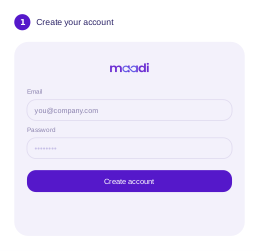
Sign up and create the workspace that will hold your selected email knowledge.
Sign up and create the workspace that will hold your selected email knowledge.
Sign up and create the workspace that will hold your selected email knowledge.

Connect Google, Microsoft or another supported provider.
Connect Google, Microsoft or another supported provider.
Connect Google, Microsoft or another supported provider.
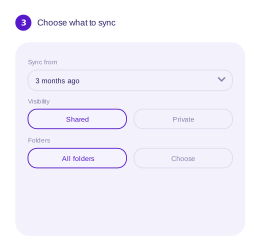
Choose how far back to go, whether email is shared or private, and which folders Maadi should include.
Choose how far back to go, whether email is shared or private, and which folders Maadi should include.
Choose how far back to go, whether email is shared or private, and which folders Maadi should include.

Maadi builds a work-focused inbox from the selected email while your original inbox continues to work as before.
Maadi builds a work-focused inbox from the selected email while your original inbox continues to work as before.
Maadi builds a work-focused inbox from the selected email while your original inbox continues to work as before.
See the conversations that matter, in the context of the work.
See the conversations that matter, in the context of the work.
See the conversations that matter, in the context of the work.
Instead of scanning a general-purpose inbox, you work from a view organised around projects, accounts or other business context. Relevant messages, attachments and summaries stay together, with the source conversation available when you need the detail.
Instead of scanning a general-purpose inbox, you work from a view organised around projects, accounts or other business context. Relevant messages, attachments and summaries stay together, with the source conversation available when you need the detail.
1
Only the email you choose to sync
2
Organised around projects, accounts or other work
3
Attachments and decisions shown with their context
4
Summaries that point back to source messages
Ask about the work. Not the wording of the email.
Ask about the work. Not the wording of the email.
Search by a project, invoice, ticket or plain-language question. Maadi can bring together the related conversations and attachments, summarise what happened, and show you the sources behind the answer.
Search by a project, invoice, ticket or plain-language question. Maadi can bring together the related conversations and attachments, summarise what happened, and show you the sources behind the answer.

See the conversations that matter, in the context of the work.
See the conversations that matter, in the context of the work.
See the conversations that matter, in the context of the work.
Instead of scanning a general-purpose inbox, you work from a view organised around projects, accounts or other business context. Relevant messages, attachments and summaries stay together, with the source conversation available when you need the detail.
Instead of scanning a general-purpose inbox, you work from a view organised around projects, accounts or other business context. Relevant messages, attachments and summaries stay together, with the source conversation available when you need the detail.

MCP is the secure connection that lets a compatible AI assistant use authorised maadi knowledge.

Mail is one view into your wider business knowledge.
Mail is one view into your wider business knowledge.
Email is often where the story of the work lives - but it is rarely the only source. Maadi is designed to connect selected email with files and business systems, giving your team a private layer for finding context, asking questions and acting on what the organisation already knows.
Email is often where the story of the work lives - but it is rarely the only source. Maadi is designed to connect selected email with files and business systems, giving your team a private layer for finding context, asking questions and acting on what the organisation already knows.

Start with the email problem. Expand into the knowledge your team needs next.
Start with the email problem. Expand into the knowledge your team needs next.
You decide what maadi can see.
You decide what maadi can see.
You decide what maadi can see.
Choose the account, how far back to sync, which folders to include and whether email is shared or private. The controls are visible before syncing begins and can be changed later in settings.
Choose the account, how far back to sync, which folders to include and whether email is shared or private. The controls are visible before syncing begins and can be changed later in settings.

Choose the account
Choose the account

Choose the history
Choose the history

Choose the folders
Choose the folders

Choose the visibility
Choose the visibility
Questions, answered plainly.
Does maadi replace Outlook or Gmail?
What can I choose to sync?
Can I connect more than one account?
Who can see synced email?
Is maadi Mail another inbox I have to manage?
What is MCP?
Is maadi Mail a standalone product?
Is maadi Mail available now?
Let's prove it on one use case.
Let's prove it on one use case.
Let's prove it on one use case.
We will take your messiest operational reporting bottleneck and automate it completely. No massive commitments, just a focused 30 day proof of concept to show you exactly how we work.
We will take your messiest operational reporting bottleneck and automate it completely. No massive commitments, just a focused 30 day proof of concept to show you exactly how we work.
Land small · Expand when it's earned · Fully managed at every stage
Land small · Expand when it's earned · Fully managed at every stage
Land small · Expand when it's earned · Fully managed at every stage