
READS FROM WHERE YOUR DOCUMENTS ALREADY LIVE
SharePoint
Microsoft Teams
OneDrive
Network drives
Your original documents stay where they are. No migration. No new filing system.
ONE DOCUMENT, AS YOUR TEAM SEES IT TODAY
Statement of Work.docx
Project folder | modified 4 Jun
SOW_v2_FINAL.docx
Email attachment | 19 Jun
Nothing here is filled wrongly. The filenames alone don't tell you which one you should send.



None of this means your team is doing anything wrong.
It's just how modern work happens.
Files move. Copies get made. Emails get forwarded. Teams conversations add context. AI makes creating and transforming information easier than ever.
The problem isn't creating more information.
It's knowing where the right information is when you need it.
WHERE IT ALREADY LIVES
Files in SharePoint and network drives
Attachments in email
Messages and threads in Teams
MAADI
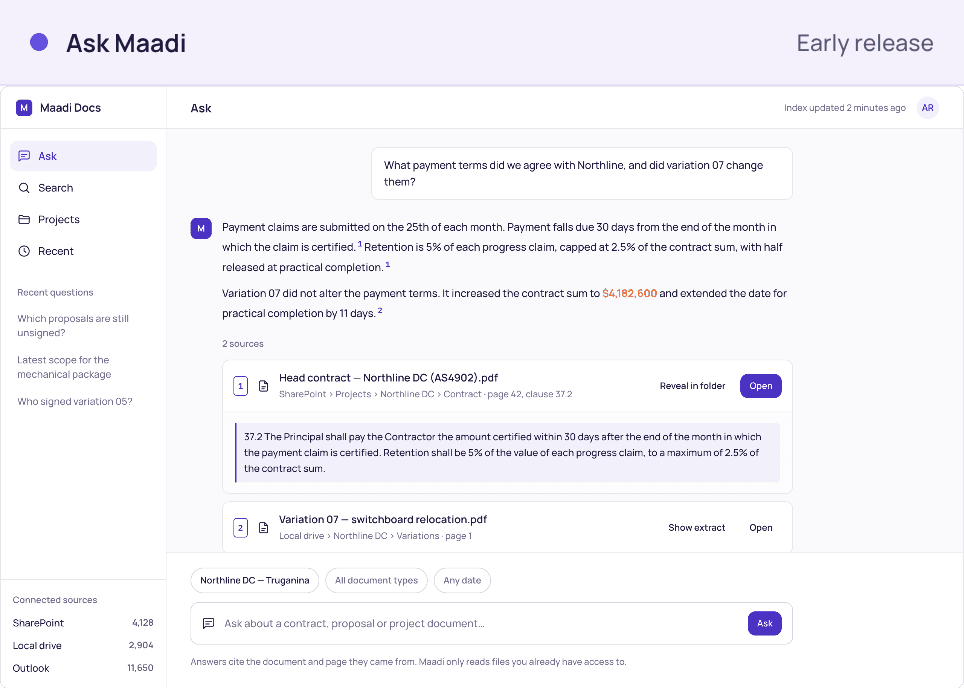
Reads it where it sits and works out what it is
Nothing is moved, copied or reorganised
1
maadi looks across your existing information
Files, emails, messages and the systems your team already uses.
2
maadi understand the context
Versions, conversations, people, dates, and where infomration came from.
You don't need everyone to remember where something was saved.
maadi remembers for you.
1
Show us the report
Bring the report, spreadsheet or board pack your team currently rebuilds. We identify the data, format, audience and delivery requirements.
2
We design and automate it
We connect the governed data, create the report template and configure the recipients, formats, permissions and schedule.


Different capable people naturally organise information directly.
Give four people the same set of documents and you will probably get four structures. Neither person is necessarily wrong.
Clients / Henderson / 2026
2026 / Clients / Henderson
Project / Fitout / Henderson
HND / contracts / final_v3
As the team grows, keeping everyone else's filing logic in your head stops being realistic.
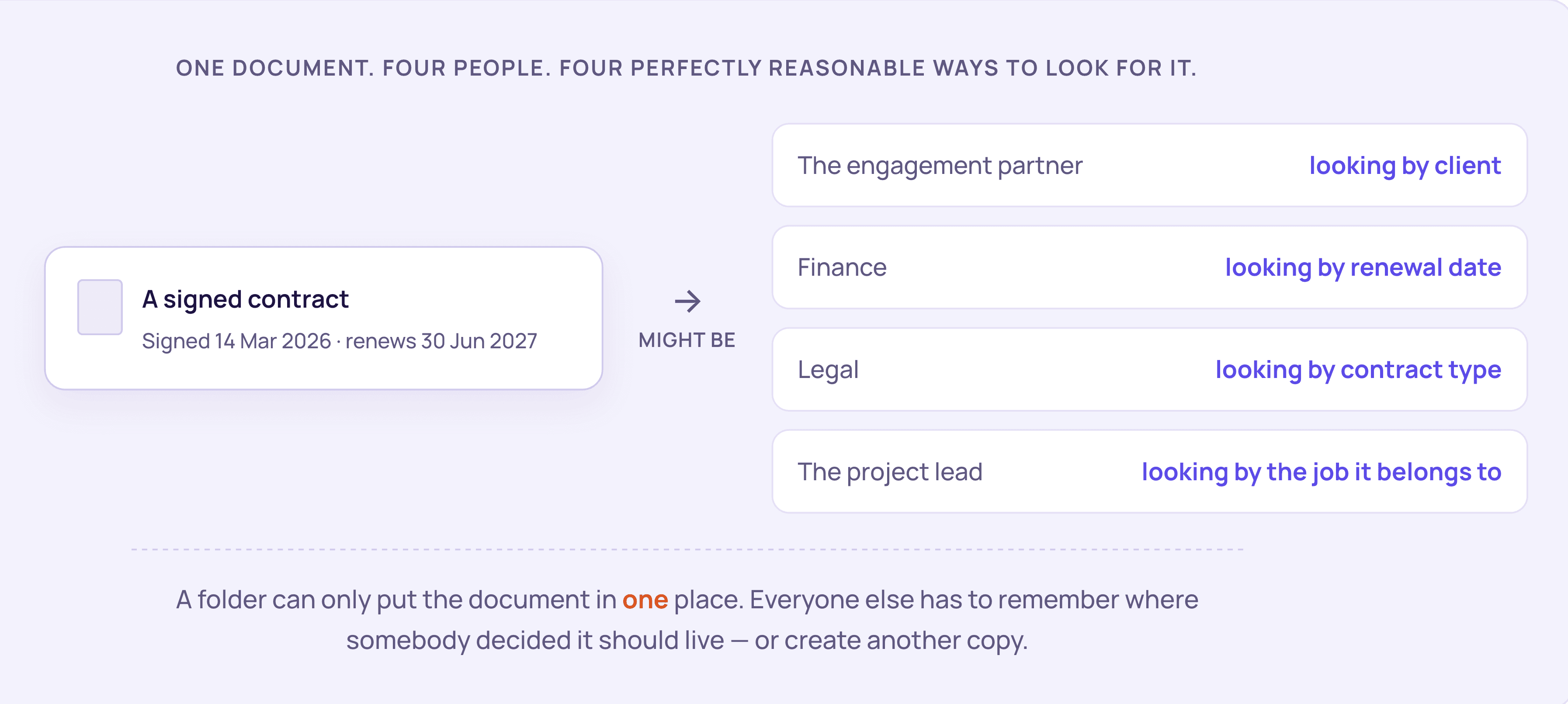
One document can logically belong in several places.
A folder can only choose one. That is where duplication starts.
Stop finding documents by where someone stored them. Start finding them by what they are.
A signed contract is still a signed contract whether it's in SharePoint, on a network drive, attached to an email or sitting on someone's desktop.
What the document is doesn't change because somebody saved it somewhere different.
maadi helps you find the information — without needing to know where somebody put it.
Think about the photos on your phone.
You don't remember which folder your phone used to store a photo. You find it by who is in it, roughly when it was taken, where you were, or what was happening.
Nobody designed a folder tree for that.
maadi brings that same idea to your work
70%
spend an hour or more hunting for one piece of information. 23% spend over five hours.
Unisphere Research, 2024
$14k
lost per knowledge worker each year to poor information access.
IDC
Four things worth insisting on
If you are going to spend money on this, these are the criteria we would hold any solution to, including ours. They are the common reasons document projects stall.
Your documents stay where they are
If the answer starts with a migration, you are solving a much bigger change-management problem before you have solved search. Nothing needs to move for you to find things.
Classification happens without your people doing it
Any system that depends on staff tagging documents correctly will decay, for exactly the reasons folders decay. It has to read the document and work it out.
Nobody has to change how they work
If adoption requires everyone to learn a new place to save things, adoption becomes the project. Your team should be able to carry on exactly as they do today.
Someone other than your team runs it
Most of the stalled projects we see stalled because the person driving it had a day job. If it needs an internal owner with spare capacity, be realistic about whether that person exists.
We built maadi against these four, because they are where we have watched document projects come unstuck. Hold us to the list when we walk you through it.
maadi is not another place to put documents. It is a layer that reads what you already have, works out what each thing ism and keeps track of it.
RECOGNISING
Built for reporting at scale
Contracts, invoices, variations, reports. Read and classified wherever they sit, including email attachments.
FINDING
Find by what it is about
One search across every connected system. The current version, not ten near-identical filenames.
TRACKING
Every version, and who signed off
Which version is current, what changed, who approved it and when.

maadi Docs is an early-release product in active build, and the screens above are the current product. Some of what you see is still being extended with early-access customers, and we will be specific about what is available today when we walk you through it.
FRIDAY 4:52 PM
Signed variation arrives by email
VAR-07_signed.pdf
MAADI READS IT
Classified as a signed variarion
Not just "an attachment"
The file never moves. It stays in the inbox and the folder it was saved to.
Today
01
It gets saved somewhere, named something, by whoever opened the email. Or it stays in the inbox and nobody else knows it exists
02
Three weeks later someone needs it, searches four systems and finds two files with similar names
03
Somebody phones the person who sent it, who is now on leave
With maadi
01
Maadi recognises it as a signed variation, not just an attachment, and links it to the client, the matter and the contract it varies
02
It stays exactly where it was saved. Nobody is asked to do anything differently
03
Three weeks later, anyone with permission finds it in one search, with the version history already recorded
YOUR SYSTEMS
maadi
Mirrors them. Never widens them.
No second set of access tules to maintain
WHAT EACH PERSON SEES

Nguyen finds the signed contract

A contractor never sees it exists
Nothing moves
maadi reads from where your documents already live. Your existing systems keep working exactly as they do now, and your team keeps saving work where they always have.
Your permissions, unchanged
maadi mirrors the access rules already set in your systems. It is designed never to widen access: if you cannot open a file today, Maadi will not show it to you.
In business
Projects delivered
Average client relationship
To first value, not quaters
Influence what gets built next
Work directly with the implementation team
Have direct input into how the product evolves
Preferential early-access commercial terms where applicable
The honest answers to what you are probably thinking
We already have SharePoint, Teams and Microsoft 365
What does maadi cost?
How long does seup take?
Which systems can maadi work with?
What happens to our data when AI is involved?
Do people have to change how they work?
What if it classifies something incorrectly?
Do we have to move our documents?
Will this widen access to sensitive files?
We tried a document project before and it stalled
We don't have anyone to run it